

注,这其实是 v3.8.50 (目前最新版)中的 BUG,对于快到来的 v3.8.51 应该已经有人(或者 AI) PR 了,现在不急配置的等下个版本就行。
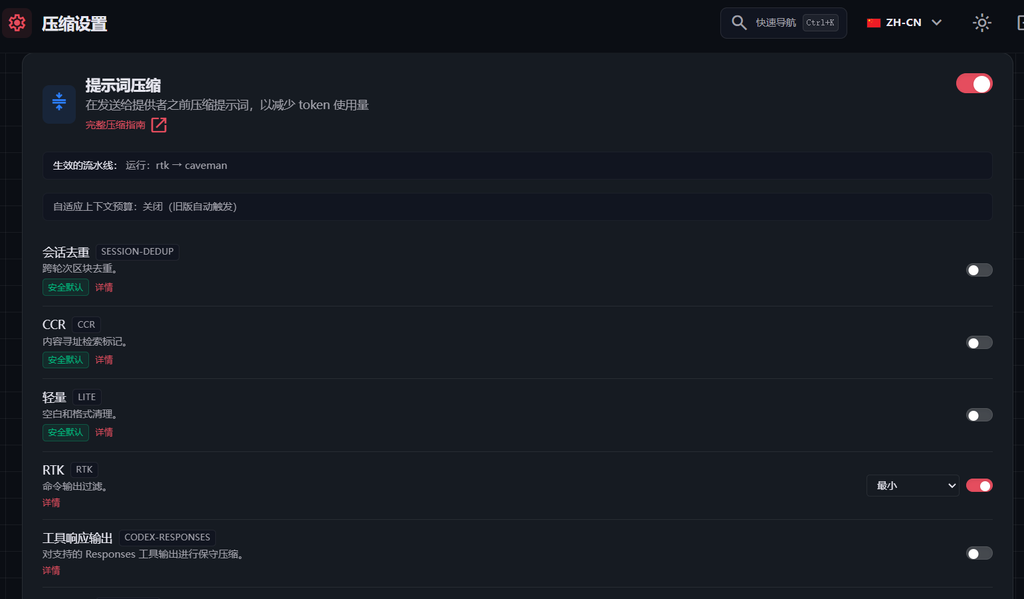
起因是部署的 OmniRoute 中想试试压缩,结果压缩配置中已经开启了选项:
引擎组合中也保持了默认的:
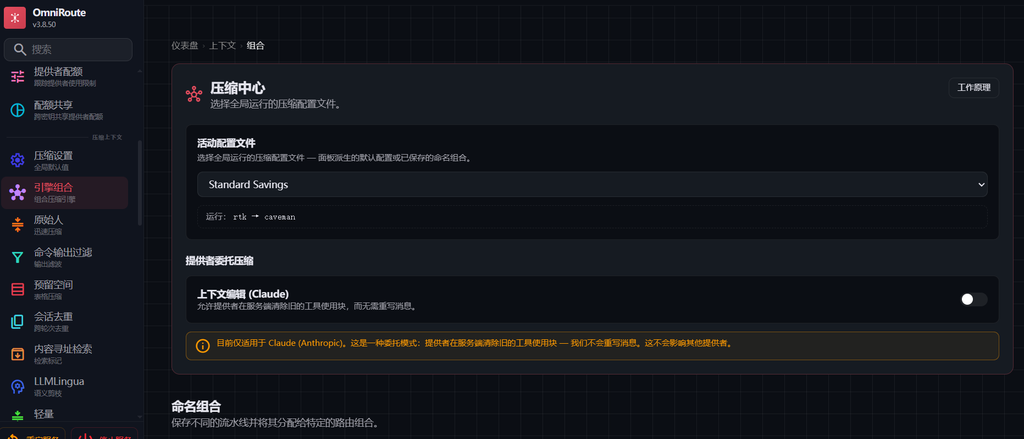
但就是启动不了压缩。
让 AI 翻了下 OmniRoute 的 Github,发现根因之一可能是上面 自适应上下文预算:关闭(旧版自动触发),是关闭的状态,但是没有地方启用(这个就是 v3.8.50 的 BUG 之一,UI 未做适配)。
在
自适应上下文预算:关闭(旧版自动触发) 状态下,旧配置会设置一个很大的值(200000),只有 token 到达这个数量时才会执行这个管线!然后访问 /api/settings/compression 看了下相关压缩的配置:
{
  "enabled": true,
  "defaultMode": "standard",
  "autoTriggerMode": "lite",
  "autoTriggerTokens": 0,
  "cacheMinutes": 5,
  "preserveSystemPrompt": true,
  "preserveSystemPromptMode": "always",
  "mcpDescriptionCompressionEnabled": true,
  "comboOverrides": {

  },
  "compressionComboId": null,
  "stackedPipeline": [
    {
      "engine": "rtk",
      "intensity": "standard"
    },
    {
      "engine": "caveman",
      "intensity": "full"
    }
  ],
  "engines": {
    "session-dedup": {
      "enabled": false
    },
    "ccr": {
      "enabled": false
    },
    "lite": {
      "enabled": false
    },
    "rtk": {
      "enabled": true,
      "level": "minimal"
    },
    "codex-responses": {
      "enabled": false
    },
    "headroom": {
      "enabled": false
    },
    "relevance": {
      "enabled": false
    },
    "caveman": {
      "enabled": true,
      "level": "lite"
    },
    "aggressive": {
      "enabled": false
    },
    "llmlingua": {
      "enabled": false
    },
    "ultra": {
      "enabled": false
    },
    "omniglyph": {
      "enabled": false
    }
  },
  "activeComboId": "default-caveman",
  "ultraEngine": "heuristic",
  "ultraSlmPrewarm": false,
  "liveZone": {
    "enabled": false
  },
  "lite": {
    "compressToolResults": true
  },
  "codexResponsesConfig": {
    "enabled": false,
    "minBytes": 512,
    "maxOutputBytes": 2097152,
    "maxCandidateBytes": 524288,
    "maxLines": 160,
    "minSearchMatches": 8,
    "minLogLines": 24,
    "preserveToolNames": [
      "Read",
      "Glob",
      "Grep",
      "Write",
      "Edit",
      "WebSearch",
      "WebFetch",
      "read",
      "glob",
      "grep",
      "write",
      "edit",
      "web_search",
      "web_fetch"
    ]
  },
  "cavemanConfig": {
    "enabled": true,
    "compressRoles": [
      "user"
    ],
    "skipRules": [],
    "minMessageLength": 50,
    "preservePatterns": [],
    "intensity": "lite"
  },
  "cavemanOutputMode": {
    "enabled": false,
    "intensity": "lite",
    "autoClarity": true
  },
  "outputStyles": [],
  "rtkConfig": {
    "enabled": false,
    "intensity": "minimal",
    "applyToToolResults": true,
    "applyToCodeBlocks": false,
    "applyToAssistantMessages": false,
    "enabledFilters": [],
    "disabledFilters": [],
    "maxLinesPerResult": 120,
    "maxCharsPerResult": 12000,
    "deduplicateThreshold": 3,
    "customFiltersEnabled": true,
    "trustProjectFilters": false,
    "rawOutputRetention": "never",
    "rawOutputMaxBytes": 1048576,
    "rawOutputMaxFiles": 100000,
    "rawOutputMaxAgeDays": 30,
    "enableGrouping": false,
    "groupingThreshold": 3,
    "stripCodeComments": false,
    "preserveDocstrings": true,
    "enableRenderers": false
  },
  "languageConfig": {
    "enabled": true,
    "defaultLanguage": "en",
    "autoDetect": true,
    "enabledPacks": [
      "en"
    ]
  },
  "aggressive": {
    "thresholds": {
      "fullSummary": 5,
      "moderate": 3,
      "light": 2,
      "verbatim": 2
    },
    "toolStrategies": {
      "fileContent": true,
      "grepSearch": true,
      "shellOutput": true,
      "json": true,
      "errorMessage": true
    },
    "summarizerEnabled": true,
    "maxTokensPerMessage": 2048,
    "minSavingsThreshold": 0.05
  },
  "ultra": {
    "enabled": false,
    "compressionRate": 0.5,
    "minScoreThreshold": 0.3,
    "slmFallbackToAggressive": true,
    "maxTokensPerMessage": 0
  },
  "headroom": {
    "minRows": 8
  },
  "sessionDedup": {
    "minBlockChars": 80,
    "fuzzy": false
  },
  "ccr": {
    "minChars": 600,
    "retrievalRampFactor": 2
  },
  "contextBudget": {
    "mode": "off",
    "policy": "reserve-output",
    "outputReserve": 4096,
    "safetyMargin": 1024,
    "pct": 0.85,
    "absoluteBudget": 0
  },
  "contextEditing": {
    "enabled": false
  },
  "omniglyph": {
    "profile": "aggressive"
  },
  "exclusions": [],
  "enginesExplicit": true
}
AI 给发现了几个问题:
- defaultMode:面板默认是 Standard(Caveman 预设),不是
stacked。RTK→Caveman 那套链默认不生效 - engines.rtk.enabled,rtkConfig.enabled:引擎网格里开了 RTK,但 RTK 的配置级总开关是关的 —— 引擎开了、实际不运行(配置自相矛盾,这最可疑)
- contextBudget.mode:自适应预算关闭,只能走旧版阈值自动触发
知道原因后,目前版本就可以通过 API 来开启相关配置了,同样 AI 都帮我写好了:
cd /d %TEMP%

:: 第2步:默认模式 stacked
echo {"defaultMode":"stacked"}> body1.json
curl.exe -sS -X PUT "http://YOUR_API_HOST/api/settings/compression" -H "Cookie: auth_token=YOUR_COOKIE" -H "Content-Type: application/json" -d "@body1.json"

:: 第3步:开启 RTK
echo {"rtkConfig":{"enabled":true,"intensity":"standard","applyToToolResults":true,"applyToCodeBlocks":false,"applyToAssistantMessages":false,"enabledFilters":[],"disabledFilters":[],"maxLinesPerResult":120,"maxCharsPerResult":12000,"deduplicateThreshold":3,"customFiltersEnabled":true,"trustProjectFilters":false,"rawOutputRetention":"never","rawOutputMaxBytes":1048576,"rawOutputMaxFiles":100000,"rawOutputMaxAgeDays":30,"enableGrouping":false,"groupingThreshold":3,"stripCodeComments":false,"preserveDocstrings":true,"enableRenderers":false}}> body2.json
curl.exe -sS -X PUT "http://YOUR_API_HOST/api/settings/compression" -H "Cookie: auth_token=YOUR_COOKIE" -H "Content-Type: application/json" -d "@body2.json"

:: 第4步:放宽 Caveman
echo {"cavemanConfig":{"enabled":true,"compressRoles":["user","assistant","tool"],"skipRules":[],"minMessageLength":30,"preservePatterns":[],"intensity":"standard"}}> body3.json
curl.exe -sS -X PUT "http://YOUR_API_HOST/api/settings/compression" -H "Cookie: auth_token=YOUR_COOKIE" -H "Content-Type: application/json" -d "@body3.json"

:: 第5步:开启自适应预算 floor
echo {"contextBudget":{"mode":"floor","policy":"reserve-output","outputReserve":4096,"safetyMargin":1024,"pct":0.85,"absoluteBudget":0}}> body4.json
curl.exe -sS -X PUT "http://YOUR_API_HOST/api/settings/compression" -H "Cookie: auth_token=YOUR_COOKIE" -H "Content-Type: application/json" -d "@body4.json"

:: 第6步:回读校验
curl.exe -sS "http://YOUR_API_HOST/api/settings/compression" -H "Cookie: auth_token=YOUR_COOKIE"

del body1.json body2.json body3.json body4.json
目前来看配置都开启了:
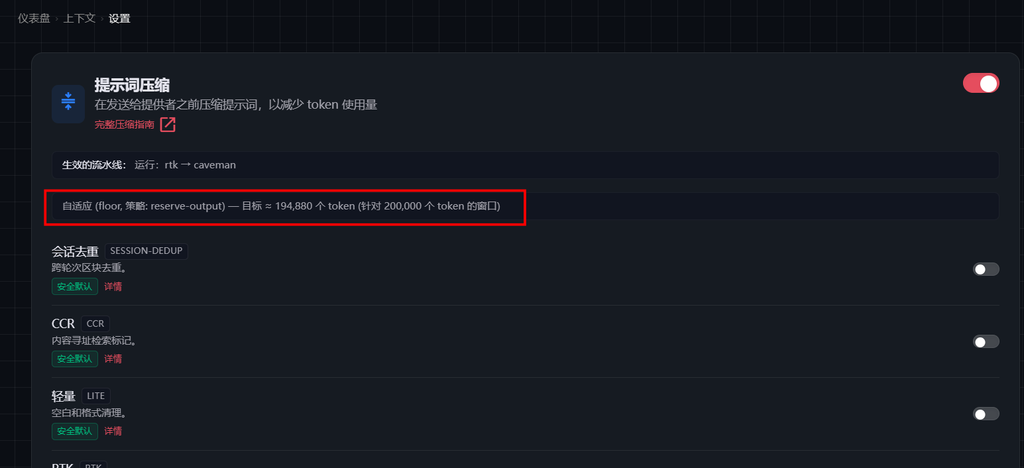
看看后面的效果吧,哎,用 AI 写的东西真是用的不太放心,但是用 AI 检查问题是真的快。。。
快快长大吧~
Comments NOTHING