

目前 frigate v0.16 版本以上,添加了对人脸识别的支持。配置人脸识别不再需要 frigate + double-take + codeprojectai 了~ 官方文档也有了社区翻译,WEB UI 也有中文啦🎉~
设置人脸识别
在 frigate 配置编辑器中,全局开启人脸识别即可!(不需要的摄像头下面再手动关闭):
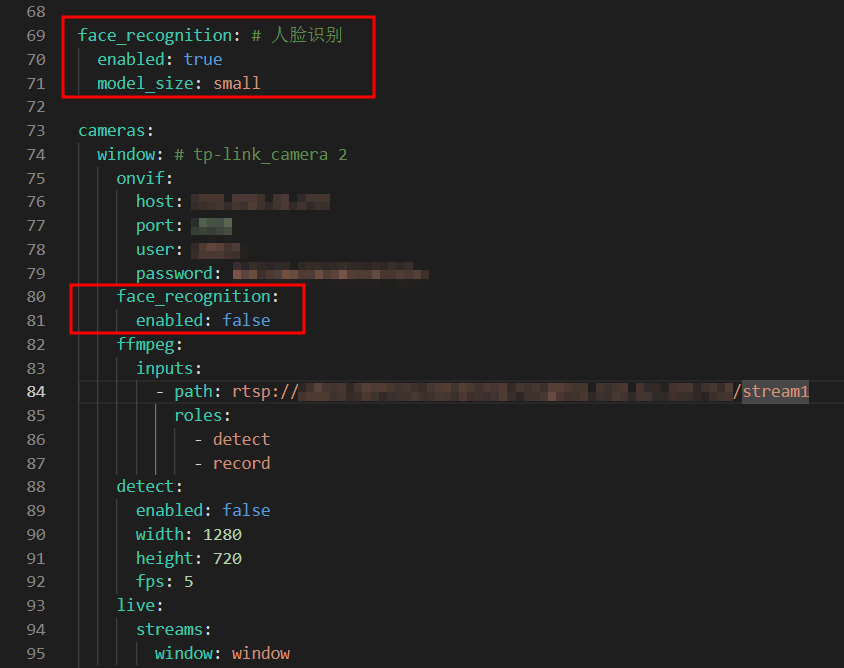
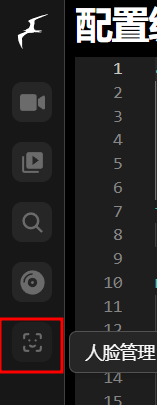
此时,保存并重启配置后,在左边栏中应该会出来一个人脸管理的按钮,点击进去后添加人脸:
然后去摄像头底下走一圈,正常就能检测到人脸数据了!
人脸训练数据和方法可以参考官方文档来进行!
Home Assistant 中的消息改动
原来在 HA 中截取了 double-take 的 MQTT 消息来判断人脸识别情况,现在只有 frigate 了,需要改动一下。
可以使用 frigate/reviews MQTT 消息来判断。以官方的示例为例:
{
  "type": "update", // new(新建), update(更新), end(结束)
  "before": {
    "id": "1718987129.308396-fqk5ka", // review_id(核查ID)
    "camera": "front_cam",
    "start_time": 1718987129.308396,
    "end_time": null,
    "severity": "detection",
    "thumb_path": "/media/frigate/clips/review/thumb-front_cam-1718987129.308396-fqk5ka.webp",
    "data": {
      "detections": [
        // 事件ID列表
        "1718987128.947436-g92ztx",
        "1718987148.879516-d7oq7r",
        "1718987126.934663-q5ywpt"
      ],
      "objects": ["person", "car"],
      "sub_labels": [],
      "zones": [],
      "audio": []
    }
  },
  "after": {
    "id": "1718987129.308396-fqk5ka",
    "camera": "front_cam",
    "start_time": 1718987129.308396,
    "end_time": null,
    "severity": "alert",
    "thumb_path": "/media/frigate/clips/review/thumb-front_cam-1718987129.308396-fqk5ka.webp",
    "data": {
      "detections": [
        "1718987128.947436-g92ztx",
        "1718987148.879516-d7oq7r",
        "1718987126.934663-q5ywpt"
      ],
      "objects": ["person", "car"],
      "sub_labels": ["Bob"],
      "zones": ["front_yard"],
      "audio": []
    }
  }
}
下面是我 HA 中 Node-RED 配置,其实三个 switch 可以用一个 function 代替来判断就行:

Comments 2 条评论
NODE-RED端的JSON文档分享一下不?
@470644188 目前 Node-RED 中人脸识别用 AI 改了一下,供你参考:
[
{
“id”: “e20b34da46ab7eaf”,
“type”: “tab”,
“label”: “人脸识别”,
“disabled”: false,
“info”: “”,
“env”: []
},
{
“id”: “frigate_mqtt_in_v2”,
“type”: “mqtt in”,
“z”: “e20b34da46ab7eaf”,
“name”: “监听 Frigate 事件”,
“topic”: “frigate/events”,
“qos”: “0”,
“datatype”: “json”,
“broker”: “0a3e7c2faa6f931b”,
“nl”: false,
“rap”: true,
“rh”: 0,
“inputs”: 0,
“x”: 140,
“y”: 260,
“wires”: [
[
“3ccd05e1aa09c859”
]
]
},
{
“id”: “check_face_v2”,
“type”: “function”,
“z”: “e20b34da46ab7eaf”,
“name”: “判定非特定人员并拼接图片和视频”,
“func”: “// ====== 配置区域 ======\nconst FRIGATE_BASE_URL = \”https://YOUR_FRIGATE_IP:5000\”; // [MASKED]\nconst ALLOWED_NAME = \”YOUR_ALLOWED_NAME\”; // [MASKED]\nconst NTFY_TOPIC = \”YOUR_NTFY_TOPIC\”; // [MASKED]\n// =====================\n\nconst data = msg.payload;\n\nif (data && data.after) {\n const label = data.after.label;\n const subLabel = data.after.sub_label;\n const eventId = data.after.id;\n const camera = data.after.camera;\n\n if (label === \”person\” && subLabel !== ALLOWED_NAME) {\n const faceName = subLabel ? subLabel : \”未知陌生人\”;\n const snapshotUrl = `${FRIGATE_BASE_URL}/api/frigate/notifications/${eventId}/snapshot.jpg`;\n const clipUrl = `${FRIGATE_BASE_URL}/api/frigate/notifications/${eventId}/clip.mp4`;\n\n // 1. 设置标准的认证和内容类型 Headers(全英文,不会报错)\n msg.headers = {\n \”Authorization\”: \”Bearer YOUR_ACCESS_TOKEN\”,\n \”Content-Type\”: \”application/json\”\n };\n\n // 2. 将所有配置封装进标准的 JSON Payload 中\n msg.payload = {\n \”topic\”: NTFY_TOPIC,\n \”title\”: \”⚠️ 发现陌生人\”,\n \”message\”: `摄像头 [${camera}] 检测到陌生人: ${faceName}。点击此通知可查看监控视频回放。`,\n \”priority\”: 4, // 4 代表 high\n \”tags\”: [\”warning\”, \”camera\”],\n \”actions\”: [\n {\n \”action\”: \”view\”,\n \”label\”: \”查看图像\”,\n \”url\”: snapshotUrl\n },\n {\n \”action\”: \”view\”,\n \”label\”: \”视频回放\”,\n \”url\”: clipUrl\n }\n ]\n };\n\n return msg;\n }\n}\n\nreturn null;”,
“outputs”: 1,
“timeout”: “”,
“noerr”: 0,
“initialize”: “”,
“finalize”: “”,
“libs”: [],
“x”: 860,
“y”: 260,
“wires”: [
[
“ntfy_send_v2”
]
]
},
{
“id”: “ntfy_send_v2”,
“type”: “http request”,
“z”: “e20b34da46ab7eaf”,
“name”: “发送 ntfy 通知”,
“method”: “POST”,
“ret”: “txt”,
“paytoqs”: “ignore”,
“url”: “https://ntfy.sh/YOUR_NTFY_TOPIC”,
“tls”: “”,
“persist”: false,
“proxy”: “”,
“insecureHTTPParser”: false,
“authType”: “”,
“senderr”: false,
“headers”: [],
“x”: 1120,
“y”: 260,
“wires”: [
[]
]
},
{
“id”: “3ccd05e1aa09c859”,
“type”: “function”,
“z”: “e20b34da46ab7eaf”,
“name”: “智能核心:多人脸白名单判定”,
“func”: “const eventId = msg.payload.after.id;\nif (!eventId) return null;\n\n// 1. 初始化全局上下文变量(跨消息记忆)\nlet eventLog = flow.get(‘frigate_event_log’) || {};\nif (!eventLog[eventId]) {\n eventLog[eventId] = {\n is_self: false,\n fired: false,\n timer: null\n };\n}\n\nconst subLabel = msg.payload.after.sub_label;\nconst label = msg.payload.after.label;\nconst hasClip = msg.payload.after.has_clip;\nconst type = msg.payload.type;\n\n// ==================== 核心配置:白名单人脸列表 ====================\n// 在这里填入所有“自己人”的标签,只要匹配到其中任何一个,就会被拦截阻断\nconst targetFaces = [\”YOUR_WHITELIST_NAME\”]; \n// ==================================================================\n\n// 2. 状态更新:检查当前帧识别出的人脸是否属于白名单(多标签匹配)\nlet isMatch = false;\nif (label === \”person\” && subLabel) {\n // 只要当前识别出的 sub_label 包含数组中的任意一个名字,即判定为自己人\n isMatch = targetFaces.some(face => subLabel.includes(face));\n}\n\nif (isMatch) {\n eventLog[eventId].is_self = true;\n if (eventLog[eventId].timer) {\n clearTimeout(eventLog[eventId].timer);\n eventLog[eventId].timer = null;\n node.status({fill:\”green\”,shape:\”dot\”,text:\”识别到白名单成员,安全阻断\”});\n }\n flow.set(‘frigate_event_log’, eventLog);\n}\n\n// 3. 场景 A:收到新事件 (new),开启 6秒 倒计时机制\nif (type === \”new\” && label === \”person\”) {\n // 深度克隆当前的 msg 对象,防止引用污染\n const clonedMsg = RED.util.cloneMessage(msg);\n \n eventLog[eventId].timer = setTimeout(() => {\n // 6秒时间到,重新读取数据库最终状态\n let currentLog = flow.get(‘frigate_event_log’) || {};\n if (currentLog[eventId] && !currentLog[eventId].is_self && !currentLog[eventId].fired) {\n currentLog[eventId].fired = true;\n flow.set(‘frigate_event_log’, currentLog);\n \n node.status({fill:\”red\”,shape:\”dot\”,text:\”6秒未识别到白名单,抢先报警!\”});\n node.send(clonedMsg); // 6秒到,直接触发 PTZ\n }\n }, 6000);\n \n flow.set(‘frigate_event_log’, eventLog);\n node.status({fill:\”blue\”,shape:\”ring\”,text:\”新目标,启动6秒人脸检索…\”});\n}\n\n// 4. 场景 B:事件彻底结束 (end),执行收尾与垃圾回收\nif (type === \”end\”) {\n // 停止可能残存的定时器\n if (eventLog[eventId].timer) {\n clearTimeout(eventLog[eventId].timer);\n }\n \n const wasSelf = eventLog[eventId].is_self;\n const alreadyFired = eventLog[eventId].fired;\n \n // 彻底销毁该 ID 内存,防止长久运行卡死\n delete eventLog[eventId];\n flow.set(‘frigate_event_log’, eventLog);\n \n // 如果到结束为止都不是白名单,且在6秒内没有触发过抢跑(属于短时间事件的兜底)\n if (label === \”person\” && hasClip && !wasSelf && !alreadyFired) {\n node.status({fill:\”red\”,shape:\”dot\”,text:\”短事件结束兜底,放行\”});\n return msg;\n }\n \n if (wasSelf) {\n node.status({fill:\”green\”,shape:\”ring\”,text:\”白名单成员离场,拦截\”});\n }\n}\n\nreturn null;”,
“outputs”: 1,
“timeout”: 0,
“noerr”: 0,
“initialize”: “”,
“finalize”: “”,
“libs”: [],
“x”: 380,
“y”: 260,
“wires”: [
[
“d14535fcb5c0284e”
]
]
},
{
“id”: “d14535fcb5c0284e”,
“type”: “delay”,
“z”: “e20b34da46ab7eaf”,
“name”: “1分钟频率锁”,
“pauseType”: “rate”,
“timeout”: “5”,
“timeoutUnits”: “seconds”,
“rate”: “1”,
“nbRateUnits”: “1”,
“rateUnits”: “minute”,
“randomFirst”: “1”,
“randomLast”: “5”,
“randomUnits”: “seconds”,
“drop”: true,
“allowrate”: false,
“outputs”: 1,
“x”: 610,
“y”: 260,
“wires”: [
[
“check_face_v2”
]
]
},
{
“id”: “0a3e7c2faa6f931b”,
“type”: “mqtt-broker”,
“name”: “mqtt服务器”,
“broker”: “YOUR_MQTT_BROKER_IP”,
“port”: “1883”,
“clientid”: “”,
“autoConnect”: true,
“usetls”: false,
“protocolVersion”: “4”,
“keepalive”: “60”,
“cleansession”: true,
“autoUnsubscribe”: true,
“birthTopic”: “”,
“birthQos”: “0”,
“birthRetain”: “false”,
“birthPayload”: “”,
“birthMsg”: {},
“closeTopic”: “”,
“closeQos”: “0”,
“closeRetain”: “false”,
“closePayload”: “”,
“closeMsg”: {},
“willTopic”: “”,
“willQos”: “0”,
“willRetain”: “false”,
“willPayload”: “”,
“willMsg”: {},
“userProps”: “”,
“sessionExpiry”: “”
}
]